
Everyday gestures
| What you do | What happens |
|---|---|
| Flick the search bar left / right | Jump one page |
| Hold and drag on the search bar | Scrub through pages (dots under your thumb) |
| Tap the gear on the search bar | Open page overview |
| Drag the letter rail | Jump the app list (or contacts rail, if enabled) |
| Long-press an app or contact | Open the quick menu |
| Pinch in or long-press empty space | Page overview |
| System back | Close menus and search first; on home it cycles pages (unless traditional swiping is on) |
| Hold back (if on) | Jump to the page you chose in settings |
| Pull down from the top area | Reachability — content moves closer to your thumb |
| Double-tap the clock/header (if set) | Runs your chosen action |
| Home | Returns to Dextera — see Home button |
| Swipe pages (traditional mode) | Standard side-to-side paging |
Settings for gestures
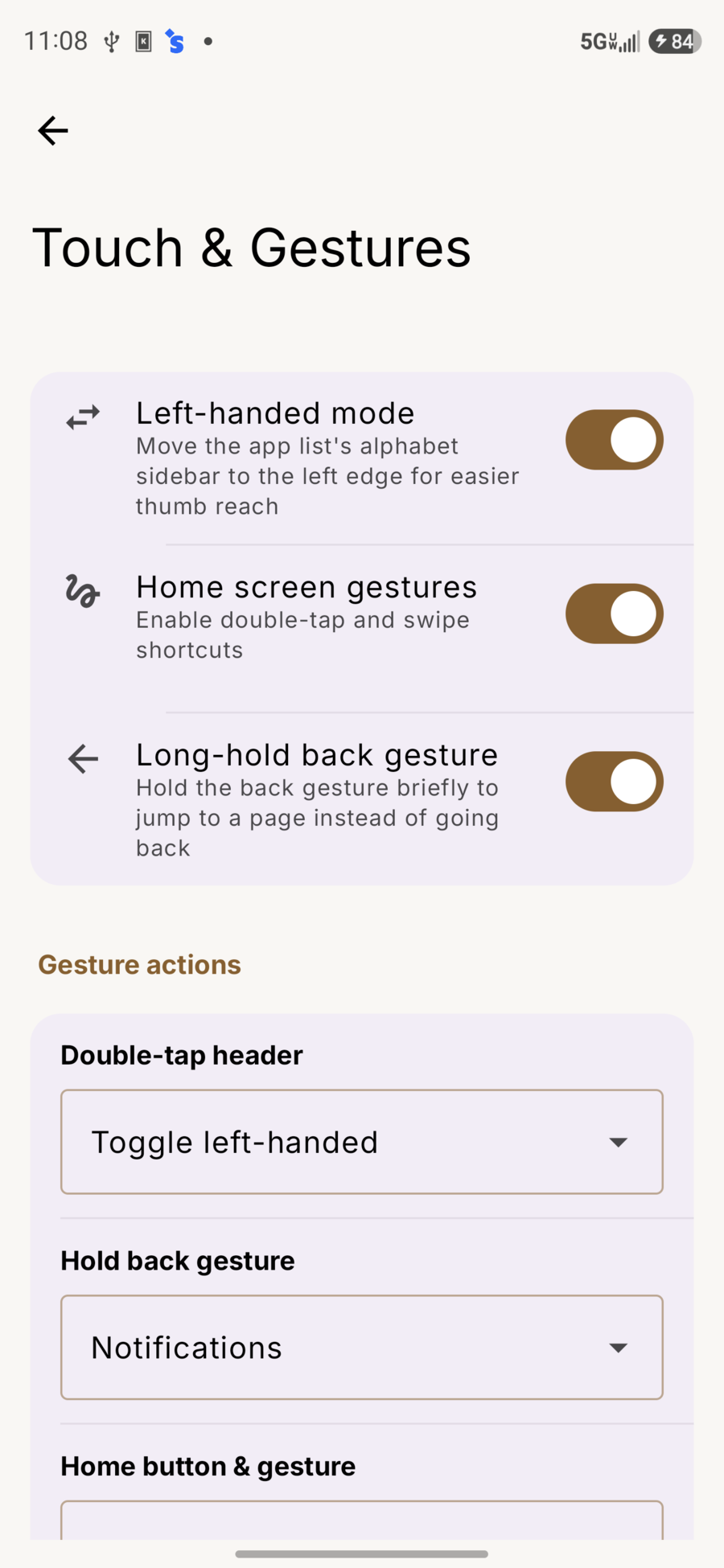
Settings → Touch & Gestures:
| Setting | Use it for |
|---|---|
| Left-handed mode | Alphabet rail on the left for easier thumb reach |
| Home screen gestures | Master switch for double-tap / swipe shortcuts |
| Long-hold back gesture | Hold back briefly to jump to a page |
| Double-tap header | e.g. Toggle left-handed |
| Hold back gesture | Target page (e.g. Notifications) |
| Home button & gesture | Default, First page, or jump to a page |
Home button
First page (recommended if you jump around a lot)
- You’re in another app → Home → back to the page you left.
- Home again while already on Dextera → first page.
Scrubbing pages
- Quick flick = one page
- Press and drag = pick any page; large name helps you aim
- Lift your finger and the scrubber goes away
Search and back
- Back first closes a long-press menu if one is open
- Then it closes search / the keyboard and returns you to home content
Tips
- Stay on the bottom search bar for most page moving — less reaching.
- Use the gear, pinch, or empty long-press when you need overview.
- Try First page on Home if you want one press for “where I was” and a second for “home base.”
- Turn on left-handed mode if the letter rail is easier on the other edge.